What Can I Take Into
the Polling Booth?
With one of the most consequential elections in decades just days away, iVoterGuide wants to make sure you have everything you need to vote wisely no matter when or where you vote.
Do you know that states differ on what can be legally taken into a polling booth? Some states, like North Carolina, allow cell phones in the polling booth as long as photographs aren’t taken. Other states, like Texas, actually prohibit the use of cell phones and other electronic devices once you’re inside the voting booth.
So, once you’ve looked through your voter guide and decided for whom you are going to cast your vote, how can you bring that information with you to your polling place?
The option we know is legal in all 50 states and now available with iVoterGuide, is to PRINT your personal list of candidates. Just look for the print icon near the list of races on your ballot. Here is an example:
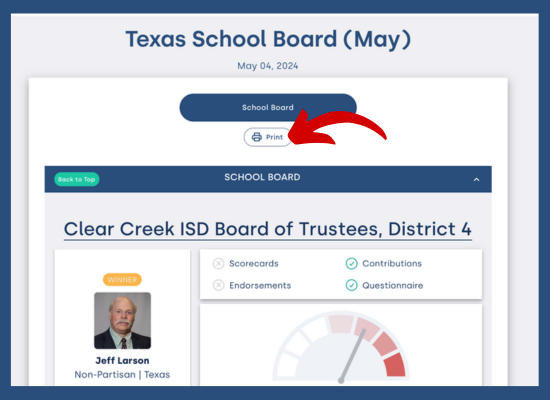
Once you’ve hit the “print” button, you’ll see check marks by each candidate’s name and two options:
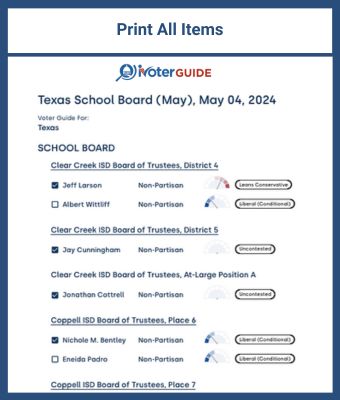
- Print all items
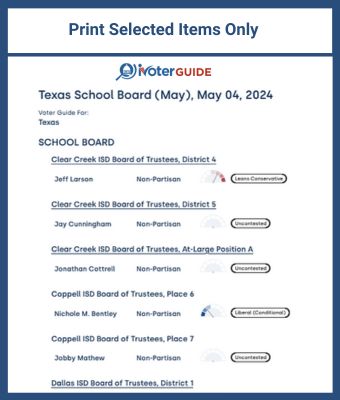
- Print selected items only
One option is to go through and select only the candidates for whom you want to vote and “print selected items only.” This will give you a list of ONLY the candidates you’ve chosen, and a more concise page to print.
If you select the candidates for whom you want to vote and “print all items,” your print-out will be longer, but you’ll be able to see all candidates in each race. With this option, if you check the box next to the candidate, that checkbox will show on the printout. You might want to do this if you’re sharing your recommendations with others.
Examples of each are show below:
 |
 |
When
you see the “print preview” on your computer, you can choose “save to PDF,” or I use “Print to PDF” to have a
downloadable file to share. Choosing one of those options makes it easier to share your recommendations with
friends and family, but you can always just print a physical copy to take for yourself (or for your family
members)! Remember, iVoterGuide never tells you who to vote for; we just give you the information you need
to be confident in your own decision.
In a 2016 study by George Barna, 72% of voter guide users said that voter guides had a “significant influence” on their vote, and six out of 10 users shared their guides with others! The print function along with “save/print to PDF” gives you some great options.
Whether you’re casting your ballot from home with a mail-in ballot or going to the polls, iVoterGuide wants to make sure you have the information you need to actually mark your ballots with your intended selections. To find the specific rules for your state, go to your local election office.
Thank you for being such a diligent voter. Let us continue to pray fervently as we each do our own part of being responsible citizens.
P.S. If you need print-ready materials to distribute to friends or groups, be sure and check out the other ways to share iVoterGuide. We
have many great options!